UX case study
Small Business Debit Card Issuance
Redesigning how TD Bank colleagues issue debit cards to small businesses, migrating off legacy software and embedding fraud prevention directly into every issuance flow.
Role
Lead UX Designer
Client
TD Bank
Platform
Odyssey Web App
Team
PO, BSA, Dev, VD, CD
Timeline
1 year
Project Overview
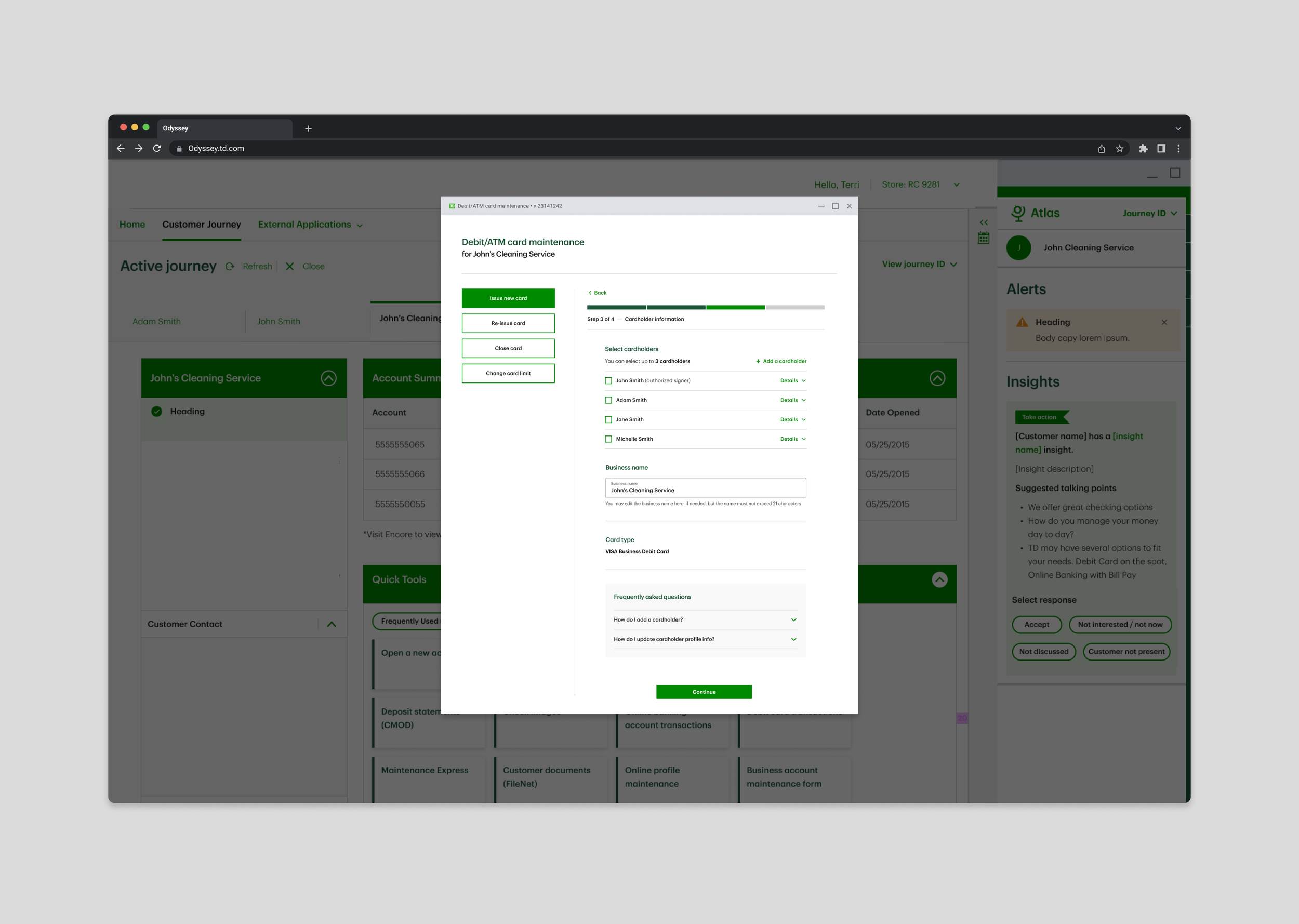
For the past 5 years, TD Bank has been working to improve how colleagues issue debit cards to personal and small business customers. The project sits at the intersection of two major initiatives: a multi-year platform migration from a legacy enterprise app to a modern web app (Odyssey), and a bank-wide effort to prevent money laundering after a high-profile fraud event.
Small businesses introduce hierarchies, authorized users, regulatory limits (5 debit cards per business), and a heightened need for sanction screening on every cardholder. The challenge: design flows that handle this complexity without slowing colleagues down or eroding trust with customers.
Strategic How-Might-We
How might TD tighten debit card controls through sanction screening for every business debit card so that we have more awareness on debit card activities and prevent money laundering?
Key Design Decisions
Sanction Screening Built-In
Informed by: Fraud Concerns & Required Data Capture
Mandatory data fields (Name, DOB, SSN, address) for every cardholder were designed directly into the issuance flow, ensuring sanction screening always runs, never as an afterthought.
Adaptive Business Rules
Informed by: Authorized User Hierarchies
The flow dynamically enforces business-specific rules the 5-card-per-business limit and authorized-user permissions without colleagues needing to memorize policy.
One App, All Issuance
Informed by: Context Switching Pain Points
Consolidated personal and small business debit card issuance into a single Odyssey workflow, eliminating the need for colleagues to switch between Encore and other tools.
Step 1 of 4 — Account Selection
Designing for Progressive Disclosure
Small business issuance requires colleagues to handle primary and secondary accounts, view existing linked cards, and respect the 5-card business limit — all in the first step. The design reveals complexity progressively, so colleagues never feel overwhelmed.
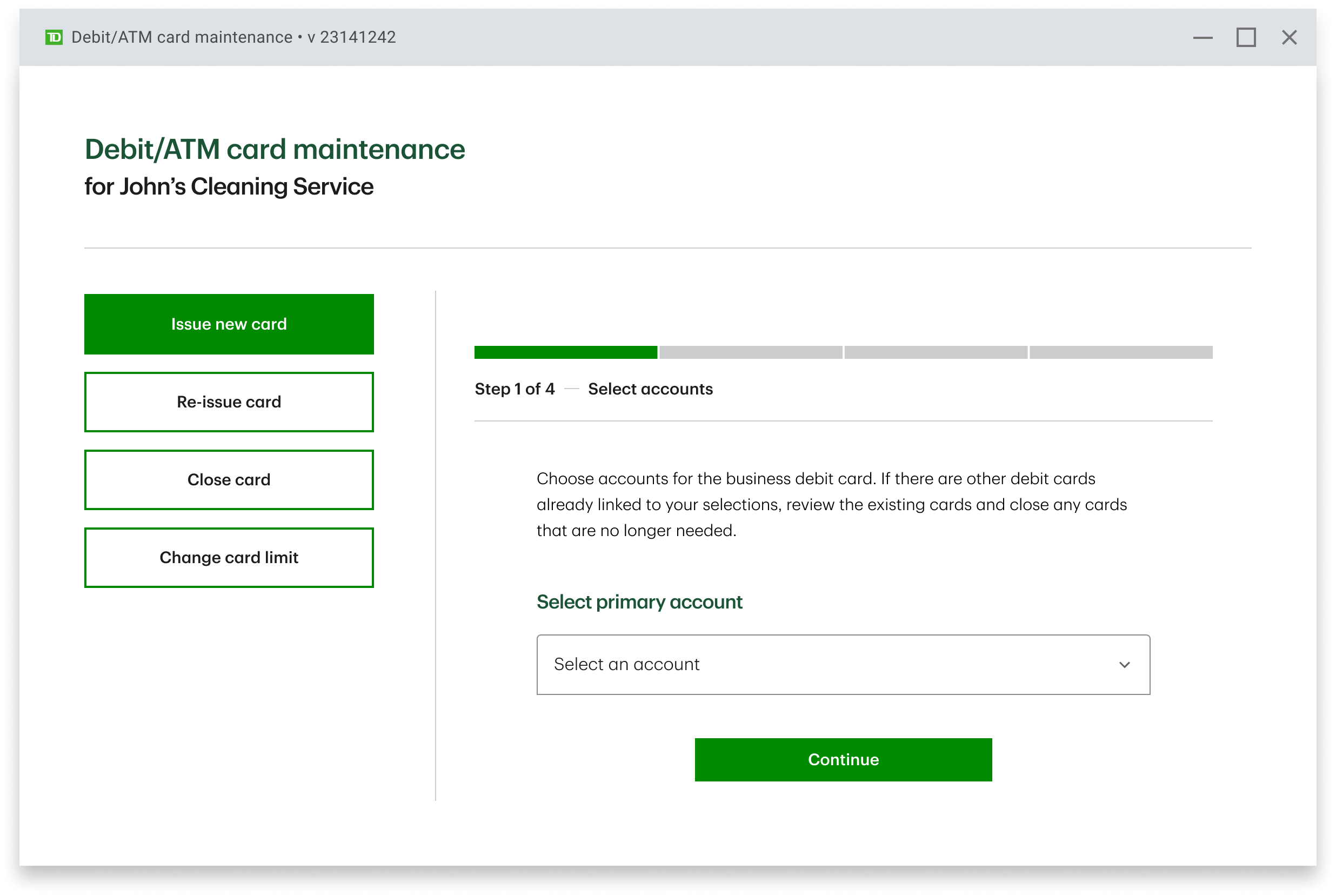
Entry Point
A clean starting point
The colleague enters the maintenance hub for John's Cleaning Service. Only "Issue new card" is shown initially, additional actions (Re-issue, Close, Change limit) appear contextually as the colleague progresses, reducing cognitive load.
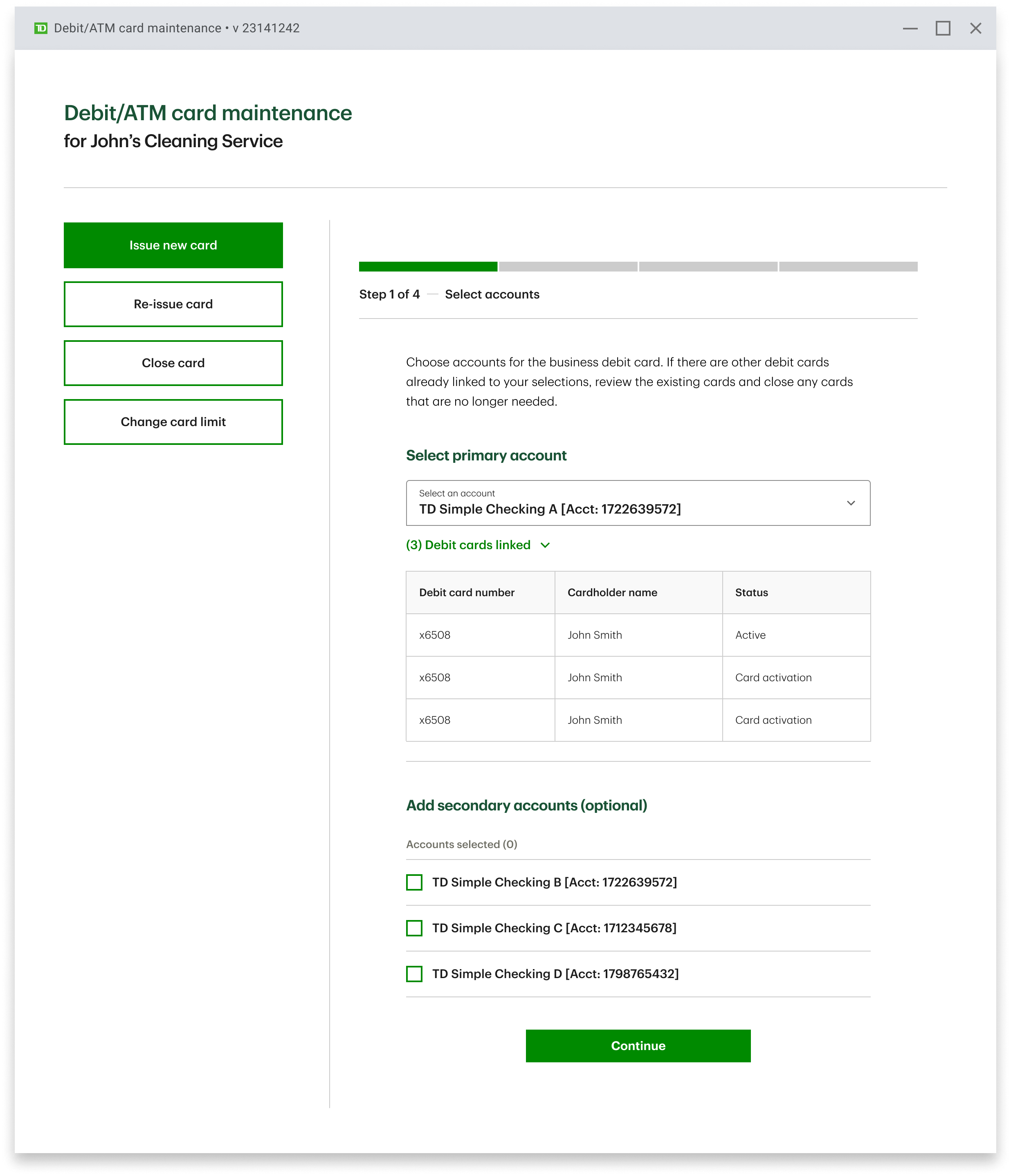
Linked Cards Visibility
Showing existing card relationships
Once an account is selected, the colleague immediately sees all existing linked cards, cardholders, and statuses. This visibility helps respect the 5-card business limit and identify cards that may need to be closed before issuing a new one, surfacing maintenance options like Re-issue, Close card, and Change limit only when relevant.
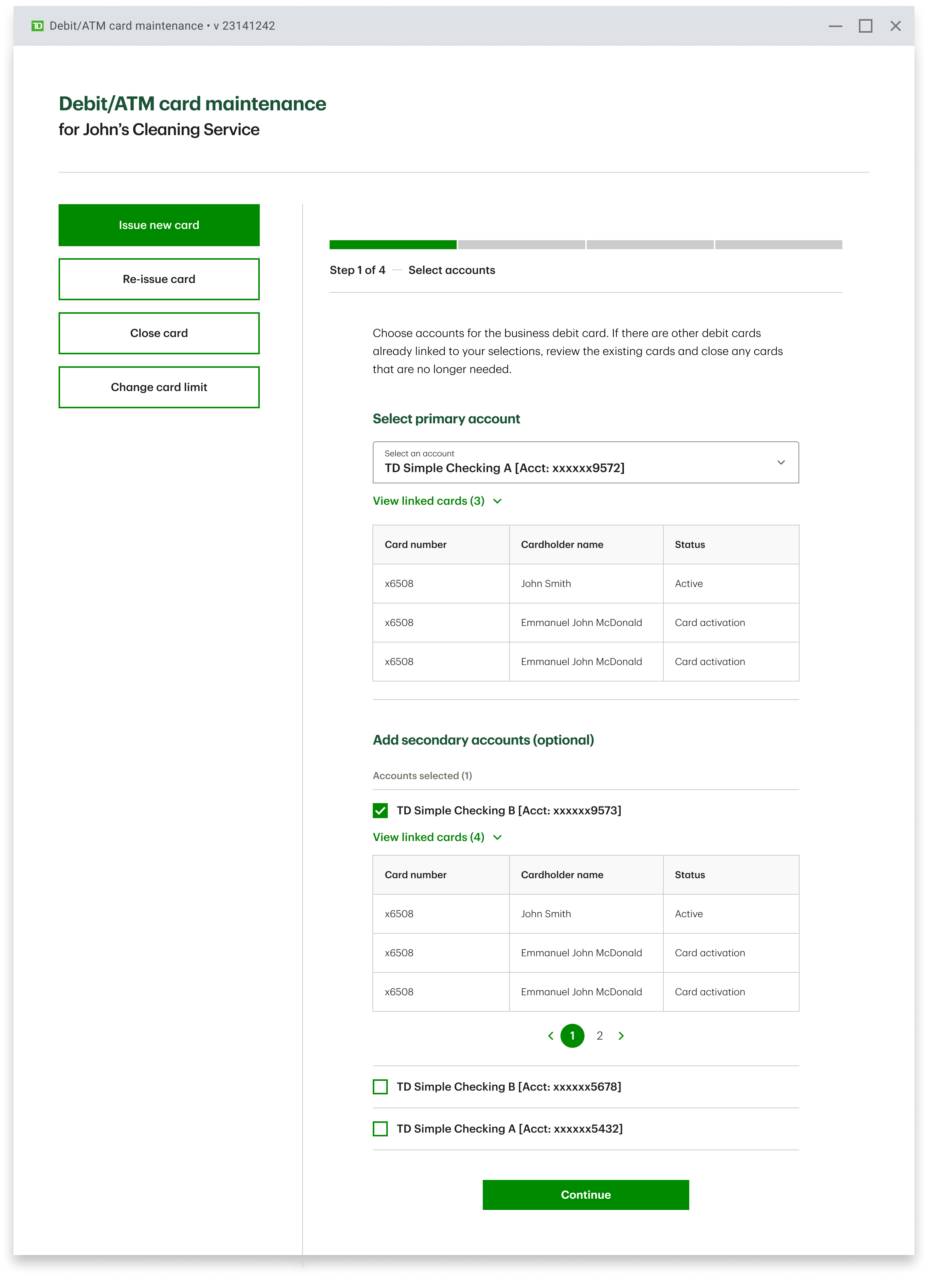
Multi-Account Issuance
Handling business complexity
Many small businesses have multiple accounts a card needs to link to. Colleagues can optionally add secondary accounts, each with their own linked card visibility and pagination. The Continue action only appears once the colleague has the context they need to move forward confidently.
Step 2 of 4 — Address verification
Confirming the Right Address, Up Front
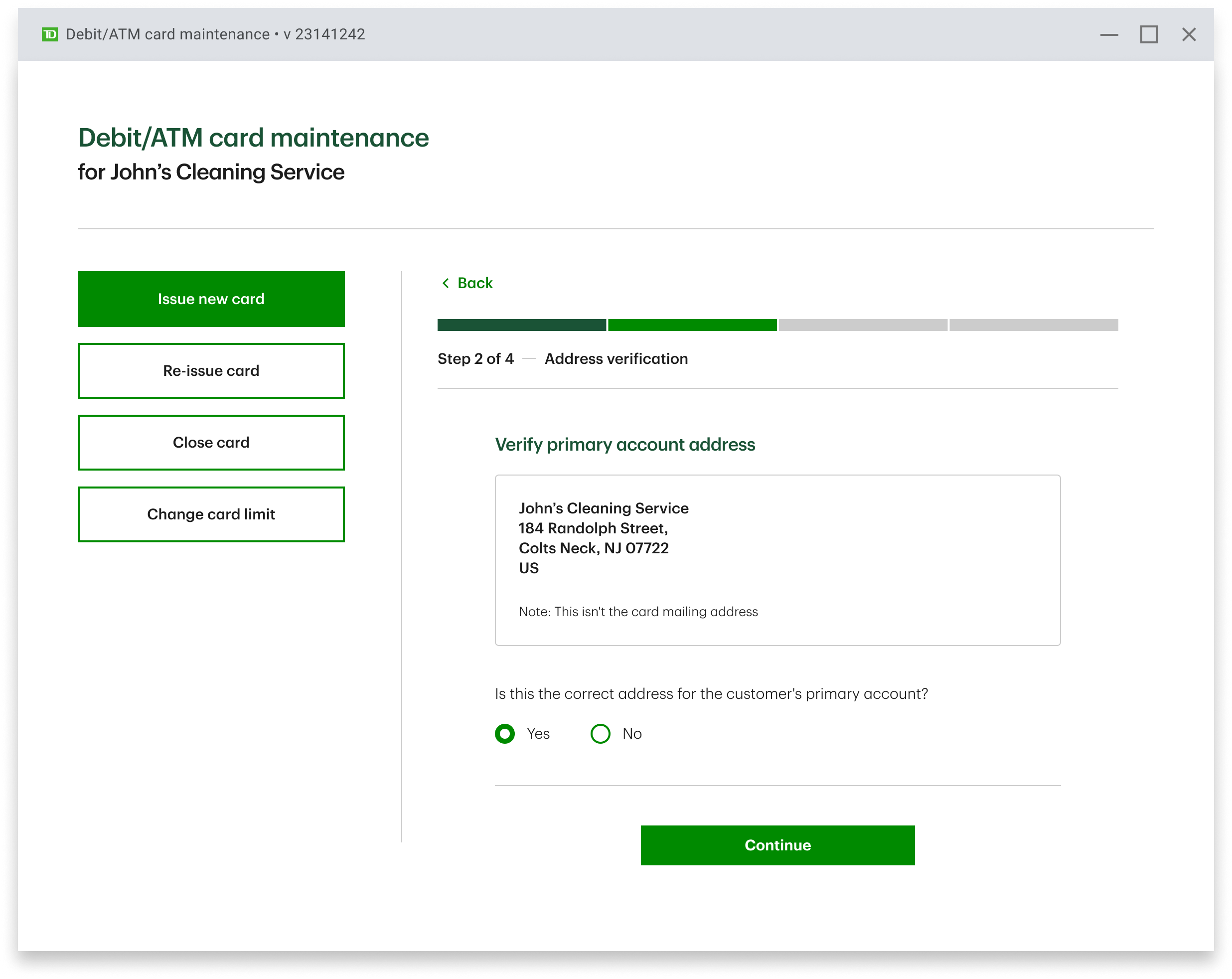
Business addresses change. Before any card is printed or mailed, the colleague verifies the primary account address with the customer — preventing wasted cards, returned mail, and the fraud risk that comes with cards sent to outdated addresses.
A single, deliberate question
The address is shown exactly as it is on file, with a clear note that this isn't the card mailing address, it's the account address. The colleague answers one question: Is this still correct?
A "No" path branches into edit-and-update without leaving the flow, while "Yes" advances the colleague forward — keeping pace with confident, fast-moving customers.
Step 3 of 4 — Cardholder information
The Heart of Sanction Screening
This is where every regulatory requirement converges. Each cardholder must have Name, DOB, SSN, address, and citizenship captured before a card can be issued — so the screen pulls all cardholders into one view, lets the colleague verify each person's details, and respects the dynamic per-business limit.
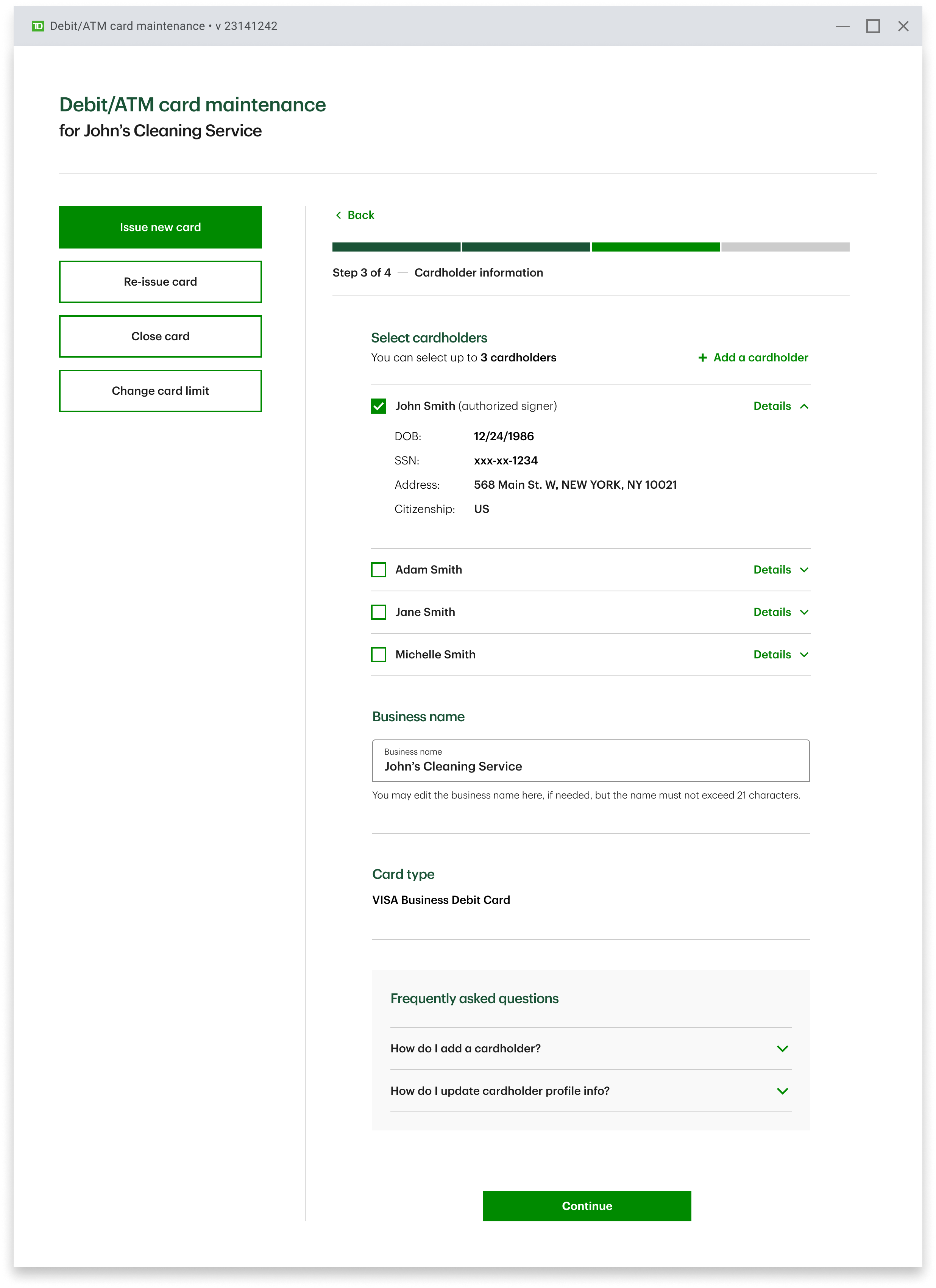
Step 3 anatomy — expanding any cardholder reveals the exact data being captured for sanction screening, so the colleague can confirm with the customer in real time.
Initial State
All known cardholders, ready to confirm
The customer's existing authorized parties surface automatically, with a clear cap and a visible "Add a cardholder" affordance for new additions.
Dynamic Limit
The 5-card rule, enforced quietly
The "up to 5 cardholders" cap recalculates against the business's existing linked cards. Colleagues never have to do the math — the rule is enforced inline, not at submission.
Screening Kickoff
An honest moment of waiting
When sanction screening launches, an inline "Launching application…" state replaces the silence. Colleagues know the system is working, customers know nothing is stuck
Step 4 of 4 — Card delivery
Per-Cardholder Delivery, in One View
Business issuance can mean four cards going to four different people. Rather than asking colleagues to repeat the same decision four times, the final step consolidates every cardholder's delivery method into one table — with the destination address confirmed in context.
Multi-Account Issuance
Handling business complexity
Many small businesses have multiple accounts a card needs to link to. Colleagues can optionally add secondary accounts — each with their own linked card visibility and pagination. The Continue action only appears once the colleague has the context they need to move forward confidently.
Selections made
Confidence to print
Once every cardholder has a delivery method chosen, the primary action — Print card — anchors the bottom of the view. The colleague closes the issuance task knowing every cardholder is accounted for, screened, and routed correctly.
Confirmation
A summary that closes one loop and opens the next
The final screen is both a receipt and a springboard. Each cardholder has its own status row — Printed or Mail in progress — so the colleague can confidently tell the customer exactly what happens next, per card. And because business customers often need more than one card, the recurring "Open another debit card" action lets the colleague loop back without restarting from the customer search.
Anatomy
One row per cardholder — expand for the full receipt
Each row collapses to the essentials: who the card is for and whether it's printed or mailing. Expanding reveals the auditable detail the colleague might be asked for — issuance timestamp, every linked account, card type, masked PAN, and the business name on file.
The pattern keeps the screen scannable for a multi-cardholder business while still surfacing audit-grade detail on demand.
States the summary handles
Real issuance is rarely uniform. The summary scales gracefully across status mixes and account counts.
Happy path
All printed in-branch
When every cardholder picks in-person delivery, every row resolves to Printed and the customer walks out with cards in hand.
Mixed status
Some printed, some mailed
Per-row statuses make it instantly clear which cards are ready today and which are en route — so the colleague can set accurate expectations with the customer.
Many accounts
Progressive disclosure for power users
Cards linked to ten-plus accounts truncate to five with a Show more / Show less toggle — keeping the summary compact without hiding compliance-relevant detail.
Recurring Action
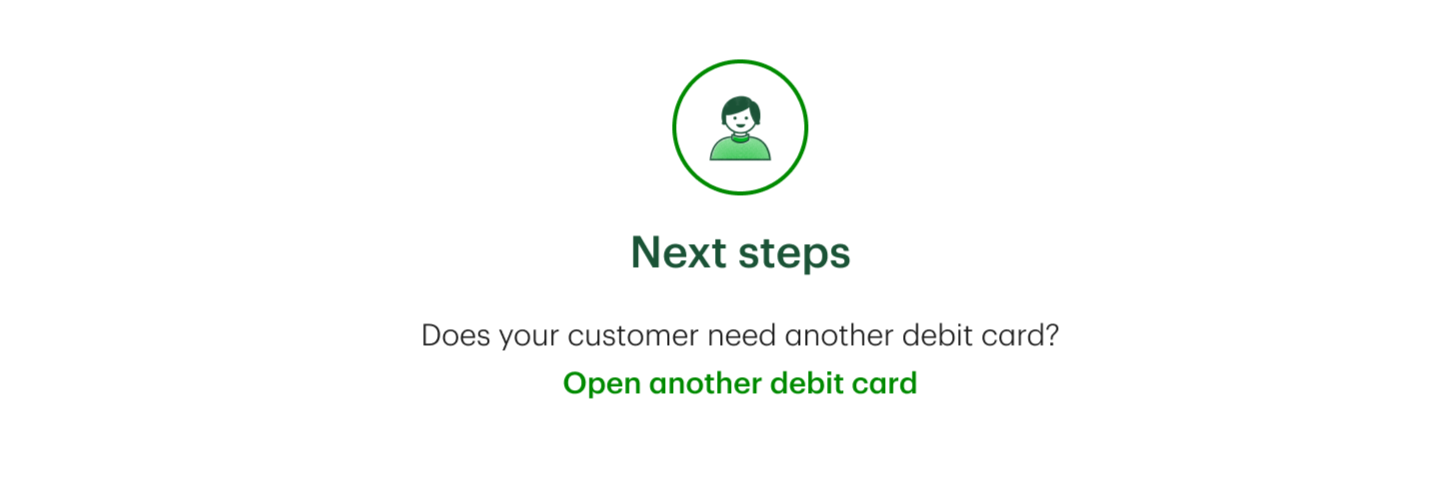
"Open another debit card" — the loop that respects context
Business customers frequently leave the branch with more than one card request. The summary surfaces a single, obvious next action that loops the colleague back into the flow with the customer's context still loaded — no re-search, no re-authentication, no lost momentum.
Across all five steps — account selection, address verification, cardholder information, delivery, and confirmation — every regulatory requirement is met without ever pulling the colleague out of the flow. Sanction screening, the 5-card business limit, per-cardholder delivery decisions, and the recurring multi-card loop all live inside the same continuous experience.
Appendix
The Challenge
Migrating off a legacy enterprise application demanded careful design thinking. Experienced colleagues were deeply trained on their legacy app’s quirks, while new hires needed flows that felt intuitive from day one. Our job was to design for both audiences without slowing either down.
On top of that, we faced strict budget and timeline constraints, forcing constant prioritization between building new functionality and enhancing existing flows. A recent money laundering event at TD meant fraud prevention couldn't be deferred. Every issuance flow had to embed sanction screening from the start.
Core problem
How can small business customers get access to their money as quickly as possible, while colleagues confidently meet every regulatory and fraud prevention requirement along the way?
Process Transformation
Before: Manual Review
Colleagues juggled multiple legacy systems to issue a single business debit card.
No native support for business regulatory rules like the 5-debit-card limit.
Sanction screening was disconnected from issuance, fraud risk slipped through gaps.
Steep learning curve for new colleagues; platform slated for discontinuation.
After: Odyssey Issuance
A single, modern application for issuing personal and business debit cards.
Business regulatory logic (5-card limit, authorized users) built into the flow.
Mandatory sanction screening on every cardholder, embedded into issuance.
Intuitive UI for both veteran and new colleagues, reducing training time.
Key Insights
Authorized User Hierarchies
Business accounts have an authorized user who can issue debit cards to other authorized or non-authorized users. The flow needed to handle multiple cardholder relationships clearly.
Fraud is a Top Concern
After a recent money laundering event, the bank initiated a sweeping fraud prevention campaign. Debit card issuance is one of the highest-impact areas to embed controls.
Required Data Capture
Every cardholder requires Name, DOB, SSN, and address to be captured for sanction screening — these fields had to be designed into the flow, not bolted on.
My Role & Approach
As the Lead UX Designer, I owned the design end-to-end from initial requirements with product owners and BSAs through visual design sign-off and developer handoff, while regularly coordinating across pods to keep flows consistent.
UX & Visual Design
Designed and iterated on the issuance workflow and interaction model, finalized visual designs, and built prototypes for complex business-specific interactions when static designs weren't enough.
Stakeholder Alignment
Led requirements alignment sessions with Product Owners, BSAs, and developers. Ran weekly feedback sessions and occasionally facilitated cross-pod collaboration to keep flows consistent.
Content & Visual Partnership
Held working sessions with Content and Visual Designers to ensure terminology and layout guided colleagues intuitively through complex regulatory and screening tasks.
Pilot Outcomes
Results & Impact
The pilot validated all three goals — proving the Mitek technology, the experience design, and branch adoption could work together at retail scale.
Increased
Small business debit card issuance volume
Reduced
Time to issue a card end-to-end
100%
Cardholders screened via embedded sanction checks
Migrated
Colleagues moved off legacy Encore
Learnings & Reflections
Trust is built into the flow, not announced. For small business customers, trust comes from a colleague who moves confidently and asks for the right information at the right time. Embedding sanction screening seamlessly into the flow was as much a trust signal as it was a regulatory requirement.
Driving adoption requires empathy for legacy users. Colleagues were deeply trained on Encore. Designing the new flow wasn't just about being better — it was about being intuitive enough that veteran colleagues would willingly leave a system they had mastered.
Prototypes bridged the developer handoff gap. With business rules layered on top of fraud screening logic, static visual designs often left ambiguity. Sharing prototypes early — especially for complex business workflows — was what got developers aligned and confident.